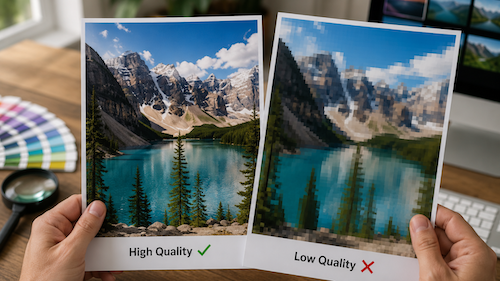
Ilisna Lane, sales manager at NUtec Digital Ink, says most individuals will judge image quality on a screen, while production and print specialists will judge image quality not only coming fresh off the printer, but also once the image or graphic has been put out there in the real world.
An image can look great on a computer screen, but in real life production it can look completely different. Viewing distance, substrate, lighting, scaling, compression, sharpening, and colour management all influence the result.
High-resolution printing does not necessarily mean that whatever image you print will be hi-resolution.
The quality of the media and the media type you are printing onto plays a massive role in your final image quality. Films and substrates with low surface free energy are normally a lot trickier to print onto than films and substrates with higher surface free energy that will give excellent print results.
What may be acceptable for a billboard viewed from 50 metres away may be completely unacceptable for: retail décor, fine art reproduction, close-view branding, backlit displays, or textile applications.
There are also quality issues that only become visible during production.
Factors That Could Impact Image Quality
Surface Energy
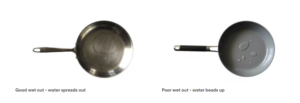
Before starting any job it is important to make sure that the substrate or film you are printing onto has a high surface free energy. This already gives you a head start in terms of how your ink will behave on the media or the substrate you have chosen. The high surface free energy substrate will create the perfect setting for the ink to wet properly on the substrate.
Ink Quality
Batch-to-batch consistency plays a major role in maintaining stable image quality in digital inkjet printing. Even small variations between ink batches can affect print performance, colour accuracy, and production reliability. Variations in pigment concentration, dispersion quality, or raw materials can cause colour shifts between production runs and inconsistent brand colours making it difficult to match previous jobs.
Environment
Having a clean, dust free environment is challenging at times, but this is crucial when it comes to image quality. Surface contamination like dust for example can cause fisheyes on the media that are normally very visible on dark colours. Humidity and temperature control are critical in digital print rooms because they directly influence print quality, colour consistency, media stability, ink performance, and equipment reliability. Poor environmental control is one of the leading causes of print defects and production inconsistency.
Pixellation
We are not talking about Roblox here, image quality for Roblox fits its purpose and lives up to the name (fun fact).
Pixellation in digital printing is when an image is scaled up beyond its native resolution. This is normally due to poor image quality or the artwork the customer has provided is not suitable to scale for large format printing resulting in blurry squares or jagged edges. Keep in mind using photos, images or designs that’s been created by AI might show plenty of flaws when the image is scaled up.
Poor Black Point
In ICC colour management, Black Point Compensation maps the source black point to the destination black point. When converting images between different colour spaces, for example from a wide-gamut RGB working space to a narrower CMYK print space, the darkest black in the source might be darker than what the destination can reproduce. With a poor black point, images can look washed out with flat shadow details and murkiness.
Inaccurate Colour Profiles
Most of your digital printers come out with a select range of pre-set ICC profiles, but getting the best image quality and colour accuracy on your digital printer will require colour profiling. An ICC profile is done using a particular media / substrate with a particular ink set and resolution. Different media require different profiles.

Machine Calibration
Also known as bi-directional alignment or horizontal calibration. This calibration ensures that print passes travelling left-to-right and right-to-left line up correctly. If incorrectly calibrated, you may see: ghosting, shadowing, blurry text, and double images.
The calibration adjusts the firing timing of the printheads to ensure accurate droplet placement across carriage movement.
Colour To Colour Calibration
Also called colour registration. This aligns each colour channel (CMYK and additional colours) so that all colours print in the exact same position. If out of alignment, you may notice: coloured outlines around text or graphics, fuzzy images, poor sharpness, and misregistered layers.
This calibration is critical for sharp text, accurate image reproduction and high-resolution output.
Step Size Calibration
Also known as media advance calibration or feed calibration. This controls how accurately the media advances between print passes.
Incorrect step size can cause: horizontal banding, white lines, overlapping passes, and density inconsistencies. The printer adjusts the media feed distance to match the print resolution and pass mode being used.
Colour Management
A print operator who understands colour management has a significant advantage in both production quality and operational efficiency. Colour management is not just a technical process, it is a production control system that helps ensure consistency, predictability, and accuracy throughout the printing workflow. Print operators that understand these fundamentals can produce consistent results across different printing platforms.
Understanding colour expectations allows operators to explain: why colours may shift between screen and print, substrate limitations, achievable gamut, and realistic production outcomes.
Having a skill set like this in your team creates trust and reduces disputes over colour accuracy with your customers. Even a perfectly captured, high-resolution image can produce poor results if colour is not managed correctly throughout the workflow. Image quality is not determined by resolution alone. In production, true image quality depends on how accurately and consistently the image reproduces from screen to final output.
What has affected your image quality that is often overlooked? Is the work you are putting out in the market good enough quality?
C1W Initiative
Change 1 Woman (C1W) aims to empower women in the branding, print and signage industries. As part of this initiative, Sign Africa would like to spotlight women-focused content like this piece. If you have any trend/business articles related to the signage, branding and printing industries, please email content to: meggan@practicalmedia.co.za. Follow C1W on Facebook and LinkedIn for more updates.
| MANUFACTURER NUTEC DIGITAL INK Tel: +27 21 763 6990 Email: info@nutecdigital.com Website: http://www.nutecdigital.com  |