White ink is not simply another colour. It is another revenue stream. Every print service provider knows the value of keeping a printer busy. But what about the jobs that never reach the production schedule? Think about the inside-glass retail promotion, the transparent label requiring an opaque white base, or the premium graphic designed for dark or metallic media. Without white ink capability, these enquiries are often declined, simplified, outsourced or never quoted at all. This is the front cover article of the September/October issue of Sign Africa Journal.
Most print service providers (PSPs) do not record the jobs they cannot produce. Yet every application turned away represents potential revenue that never reaches the printer. This is the real opportunity behind HP Latex White Ink.
It is not simply an additional ink colour. It gives PSPs access to more applications, more substrates and more demanding markets, where print is judged on its effectiveness rather than compared only by price per square metre.
Why White Changes The Possibilities
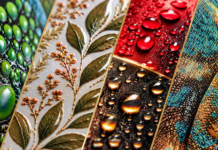
Most colour printing relies on the substrate providing the white background. Because CMYK inks are translucent, printing directly onto clear, coloured, metallic or dark media changes the appearance of the colour. Reds become less vibrant, fine details disappear and brand colours lose accuracy. White areas in the artwork become transparent or take on the colour of the substrate.
White ink changes that relationship. It can become a visible design element, an opaque foundation beneath colour, a backing layer behind an image, or the functional centre of a multi-layer graphic. The result is access to higher-value work across retail, cosmetics, packaging, hospitality, automotive, museums, corporate interiors and luxury branding. These customers are not purchasing white ink. They are purchasing a result that conventional CMYK production cannot deliver.
White ink does not simply add another colour to your printer. It adds applications to your business.

What Can White Do? Five Print Modes. Five Different Solutions.
1. Spot White: Substrate Part Of The Design

Spot white places white ink only in selected areas. It can produce lettering, logos, patterns and detailed design elements while allowing clear, coloured or metallic media to remain visible elsewhere. This creates a more intentional and premium effect than covering the substrate with a conventional white background.
2. Underflood: Give Colour A Foundation

Underflood prints white beneath the CMYK image. The white layer prevents the substrate from influencing the colour, helping graphics remain vibrant and recognisable on clear, coloured, dark or metallic materials. For brands that depend on accurate and consistent colour, the white layer is not decorative, it is what makes the design work.
3. Overflood: Protect The Graphic Behind Glass

Overflood prints colour first and places white behind it. When produced on clear media, the image can be viewed through the unprinted side. This allows it to be installed on the inside of glass while remaining correctly orientated for people outside. The graphic is protected from weather, cleaning, tampering and accidental damage, turning a print technique into a practical installation solution.
4. Three Layers: Perform In Changing Light

Three-layer sandwich printing combines colour, white and colour in one production process. The white layer separates or diffuses the colour layers, helping a graphic retain its appearance when viewed in changing lighting conditions. This makes it possible to create day/night and illuminated applications that remain visually effective whether they are frontlit or backlit.
5. Five Layers: Create Two Viewing Experiences

Five-layer printing takes the sandwich principle further. Two colour images can be separated by white and light-blocking layers, allowing different graphics to appear from opposite sides of clear media. Instead of producing and aligning two separate prints, the PSP can create a sophisticated multi-image graphic through one coordinated workflow. Do not sell the additional ink. Sell the application it makes possible.
More White Is Not Always Better
HP Latex offers a choice of white densities, reaching up to 260% on supported platforms. Higher density can increase opacity, but it also uses more ink and generally requires additional production time. The correct density depends on the media, artwork, lighting and viewing conditions.
A decorative decal may not require the same opacity as an intensely illuminated display. Using more white than the application needs increases cost without necessarily improving the result. The aim is therefore not maximum white, it is the right white.
This gives PSPs the ability to balance: opacity, production speed, ink consumption, viewing conditions, customer expectations, and selling price. That judgement is part of the expertise for which the customer pays.

The RIP Builds The Layers. Expertise Builds The Value
Professional RIP platforms such as Caldera, ONYX and SAi Flexi support workflows for creating or recognising white channels and selecting the required layer configuration.
The process typically involves defining the white areas, selecting the print mode, choosing the correct density and previewing the layer order before production. However, a layered application should never be approved only on a computer screen.
The final media, adhesive, lighting, viewing direction and installation environment can all influence the result. A physical proof under the intended conditions remains essential. The RIP manages the file while the PSP makes the application work.
When White Becomes Practical Production
The possibilities of white ink are impressive, but they only generate revenue when the technology is practical to operate. White pigments are heavier than conventional colour pigments. This has historically given white printing a reputation for difficult maintenance, ink settling and waste between jobs. HP Latex addresses these challenges as part of the complete white ink system.
White Ink That Looks After Itself
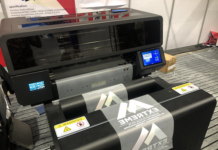
HP’s Automatic White Ink Recirculation System keeps the white ink moving, and helps prevent its heavier pigments from settling. When white is not required, the white printheads can be removed from the carriage and stored in an offline rotation chamber. This avoids unnecessary white ink waste between jobs and helps keep the printheads ready for future production.
This is commercially significant because many PSPs will use white for specialist work rather than every job. The ability to move between everyday CMYK production and premium white applications without white becoming a constant operational burden makes the capability easier to integrate into a working print business.
Ready For The Next Production Stage
HP Latex prints emerge dry, allowing them move into cutting, lamination, finishing or installation without a separate off-gassing delay. For urgent retail
campaigns, event graphics and time-sensitive promotions, reducing the delay between printing and finishing can make the difference between accepting a deadline and turning the job away.
White modes will naturally run more slowly than conventional CMYK because additional ink layers must be printed and dried. The advantage is not that a five- layer graphic prints like a standard banner. It is that a complex application can be produced through one coordinated workflow.
A Different Proposition For Indoor Graphics
HP Latex uses water-based ink technology and is suited to applications destined for retail, hospitality, corporate and interior environments. HP Latex inks carry environmental certifications on supported ink generations and are characterised by a weak, neutral odour profile. The chosen media can also influence the smell and environmental performance of the finished graphic.
For customers concerned with indoor environments, operator working conditions and brand sustainability requirements, this becomes part of the total application value. The discussion moves beyond what the printer can produce to where the finished graphic can be used with confidence.
Price The Outcome, Not Only The Square Metre
There is no responsible universal premium for white ink work. The cost and selling price depend on white coverage, density, number of layers, production time, media, proofing, finishing and installation.
A more appropriate pricing structure is:
Base print + white production cost + specialist setup and proofing + finishing and installation + value premium.
An inside-glass graphic should not be quoted as ordinary clear vinyl with an ink surcharge. A five-layer display should not be compared with a conventional lightbox print. The customer is paying for the problem being solved, the expertise required and the value of the finished result.
Managed production programmes can also make these costs easier to understand. Midcomp’s PPU and PPUGRO options provide qualifying HP Latex users with fixed or tiered cost structures that can include ink, printheads, maintenance and technical support. This helps PSPs calculate production costs more confidently while reducing exposure to unexpected operational expenses.
What Could Your Business Say Yes To?
The white areas in an artwork may appear empty. Commercially, they are anything but. White ink gives PSPs the ability to work with substrates, designs and viewing conditions that conventional colour printing cannot address effectively. It creates more reasons for a customer to choose a specialist print provider, and fewer reasons for that provider to turn an enquiry away.
The most important question is therefore not whether customers are currently asking for white ink. It is: how many applications are you missing because you cannot yet show customers what white ink makes possible?
Visit Midcomp to experience HP Latex White Ink, explore the full production range and discover whether PPU or PPUGRO could provide the right route into the technology.
Let us show you what is possible!

MIDCOMP
+27 10 020 9999
consumables@midcomp.co.za
www.midcomp.co.za